3D Terrain Generator Online Game - Procedural Landscape Creator Simulation Game
Reviews
3D Terrain Generator offers a solid balance of control and automation. The erosion simulation adds natural detail, and the texture painting is straightforward. Exporting to .obj works seamlessly. It is a reliable tool for prototyping landscapes, with enough depth for repeated use in different projects.
Description
Game Introduction:
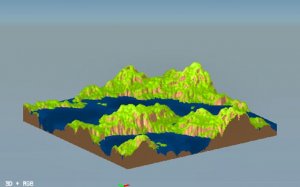
3D Terrain Generator - Procedural Landscape Creator is a browser-based toolkit for designing realistic 3D environments. It combines procedural generation algorithms with manual controls, allowing users to craft mountains, valleys, and plains from scratch. Artists and developers can import grayscale heightmaps for precision editing or generate new terrains using Perlin noise. Advanced erosion simulations add natural weathering and river paths, while the texture painting system uses RGB values and blend sliders for detailed surface customization. Finished landscapes export as .obj mesh files, compatible with popular game engines and 3D software. This tool makes professional terrain modeling accessible to everyone.How to Play:
Start by clicking Generate to create a new Perlin noise terrain or Import to load a heightmap image. Use the terrain editor sliders to adjust base height and scale in terrain units. Open the Erosion panel to simulate water flow and wind effects; control strength with factor multipliers and direction with angle settings. Switch to the Texturing section to apply colors using RGB selectors and blend percentages. Preview the result in real time, then click Export to save your terrain as a .obj mesh or image file. The interface guides you through each step for quick iteration.Game Features:
Create terrains using procedural generation or imported heightmaps. Apply realistic erosion with adjustable intensity and direction. Paint surfaces with RGB colors and blend controls. Export finished landscapes as 3D mesh files or images. The user-friendly interface supports rapid prototyping for games, films, and visualizations.Why You’ll Like It: This tool combines powerful simulation features with an intuitive workflow. It saves time in game development and digital art projects by providing ready-to-use assets. The real-time preview and simple controls make landscape creation enjoyable for beginners and professionals alike.
Compatibility
This H5 game runs smoothly on: • Desktop computers (Windows / Mac) • Mobile phones (iPhone / Android) • Tablets (iPad / Android) 🌐 Best experienced with Chrome, Safari, or Edge
Other Similar Games

Last Debt Financial RPG Simulator Online Game Strategy Game

3D Stunt Pilot - San Francisco Online Arcade Game

ZooCraft: Dream Zoo Management Online Game - Casual Simulation Game

ABC Pizza Maker Online Game - Cooking Game

Supermarket Manager Simulation Game Online Business Game

Big Euro Truck Driving Simulator Online Simulation Game

Debris Collector Online Arcade Game